
it’s been awhile… but without further ado - let’s just get into it.
Circuit breakers - what are those?
I’m gonna assume that you, my dear reader, know what they are and if not - there are smarter people than me that can explain that. Below I’ll just put a short quote from uncle Bob.
The basic idea behind the circuit breaker is very simple. You wrap a protected function call in a circuit breaker object, which monitors for failures. Once the failures reach a certain threshold, the circuit breaker opens, and all further calls to the circuit breaker return with an error, without the protected call being made at all. Usually you’ll also want some kind of monitor alert if the circuit breaker open.
Martin Fowler
Then usually the circuit breaker will test, from time to time, if it’s safe to close the circuit again. If it’s safe - we’re back online. If it’s not - we’re still failing fast.
Resilience in general is a bit broader topic and covers things like retrying,
throttling
and others. I’ll let you google that on your own if you need to.
Bottom line is - in here you will learn how to use those patterns in Spring and I’ll share a trick or two from my current project.
Which library to choose?
Last time I was dealing with circuit breakers Hystrix was the shit.
It had all the bells and whistles that we could dream of.
Now it seems it was made redundant by Resilience4j,
but looks like Spring provides it’s own implementation
(which is based on either Hystrix
or Resilience4j [ u may also check this ] underneath, but obviously the API is different).
Considerations
Things that I considered when choosing the right one:
- it was important to not only provide the needed functionality, but also enable proper logging for it. In large-scale systems this is crucial.
- endpoint configuration should be annotation based - to avoid repetitive code
- logging configuration should be generic / centralised - to avoid repetitive code
- library configuration should be external (not in code) to enable easy switching between environments
- the less code the better
- compatibility with spring-cloud-feign - because we already had it in the project
Anyway, these days nothing is as easy as “just using a lib”. Especially one that interferes with your external calls.
So Resilience4j can be used using one of the following:
- directly: io.github.resilience4j.resilience4j-circuitbreaker
- directly, with spring integration: io.github.resilience4j:resilience4j-spring-boot2 (there is also an older version for spring-boot-1, but who cares about old stuff?)
- indirectly, through spring: org.springframework.cloud:spring-cloud-starter-circuitbreaker-resilience4j
probably there are other ways, but I couldn’t be bothered
After some reading I decided to discard the first option, because it would introduce too much clutter into the project. Example? so according to official resilience4j documentation we should do the following to wrap feign clients
public interface MyService {
            @RequestLine("GET /greeting")
            String getGreeting();

            @RequestLine("POST /greeting")
            String createGreeting();
        }

        CircuitBreaker circuitBreaker = CircuitBreaker.ofDefaults("backendName");
        RateLimiter rateLimiter = RateLimiter.ofDefaults("backendName");
        FeignDecorators decorators = FeignDecorators.builder()
                                         .withRateLimiter(rateLimiter)
                                         .withCircuitBreaker(circuitBreaker)
                                         .build();
        MyService myService = Resilience4jFeign.builder(decorators).target(MyService.class, "http://localhost:8080/");
apart from a simple fact that this does not compile as-is, which I find disturbing, it’s just not readable. And it doesn’t use spring-cloud-feign
The third option caught my attention and I prepared a POC with it (which I already deleted, so I won’t recreate it here) but integrating with retries (which are also needed in my project) was annoying. I’ll just leave with an example from the official docs:
package hello;

import org.slf4j.Logger;
import org.slf4j.LoggerFactory;
import reactor.core.publisher.Mono;

import org.springframework.cloud.client.circuitbreaker.ReactiveCircuitBreaker;
import org.springframework.cloud.client.circuitbreaker.ReactiveCircuitBreakerFactory;
import org.springframework.stereotype.Service;
import org.springframework.web.reactive.function.client.WebClient;

@Service
public class BookService {

  private static final Logger LOG = LoggerFactory.getLogger(BookService.class);


  private final WebClient webClient;
  private final ReactiveCircuitBreaker readingListCircuitBreaker;

  public BookService(ReactiveCircuitBreakerFactory circuitBreakerFactory) {
    this.webClient = WebClient.builder().baseUrl("http://localhost:8090").build();
    this.readingListCircuitBreaker = circuitBreakerFactory.create("recommended");
  }

  public Mono<String> readingList() {
    return readingListCircuitBreaker.run(webClient.get().uri("/recommended").retrieve().bodyToMono(String.class), throwable -> {
      LOG.warn("Error making request to book service", throwable);
      return Mono.just("Cloud Native Java (O'Reilly)");
    });
  }
}
Log configuration was also… less than ideal.
So I was left with option two, which proved to be a good fit for our needs as it satisfies all the considerations.
Give me some code!
Ok, now that we have our library selected we can finally get some coding done.
But hey, there is a number of blog posts
and tutorials
(including the official ones)
and github issues
(or this
or that) that cover this.
Why do I think this is gonna be any better?
Because I needed to dig through all of them to come up with something that was complicated enough to satisfy my needs
and be simple enough to not annoy the hell out of me.
So I’ve done the homework for you, my dear reader. Enjoy :)
Ok, here it goes
Let’s start with the basics.
Our test app is super-simple. Important bits:
WorkingClient- a public API being called by a spring-cloud-feign clientFailingClient- a spring-cloud-feign client that always failsCircuitBreakerLoggingConfiguration- this is where the logging magic happensapplication.yml- configures log levels per feign clientapplication-resilience.yml- configures resilience4j propslogback-spring.xml- usesthe MDC trick- the usuals - dummy controller, dummy object, application main
repo is available here: https://github.com/RadBuilds/spring-with-resilient-feign
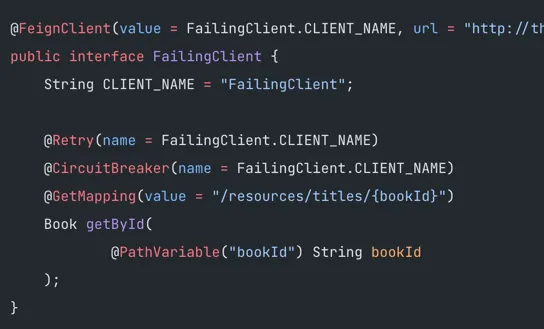
FailingClient
WorkingClient is kinda boring, so I’ll get to the interesting stuff
@FeignClient(value = FailingClient.CLIENT_NAME, url = "http://this.does.not.exist")
public interface FailingClient {
    String CLIENT_NAME = "FailingClient";

    @Retry(name = FailingClient.CLIENT_NAME)
    @CircuitBreaker(name = FailingClient.CLIENT_NAME)
    @GetMapping(value = "/resources/titles/{bookId}")
    Book getById(
            @PathVariable("bookId") String bookId
    );
}
as you can see it’s really short, but there are heaps of things happening here.
- with Feign this is it. u don’t need to
implementthe client. the declaration is enough. so this is a ready to use http client already. - We have
RetryandCircuitBreakerannotations with the client name. this bit is important, because this config name correlates to the config name in theapplication-resilience.yml - There is no logging defined here, but we will get logs as configured in
application.ymlandCircuitBreakerLoggingConfiguration
CircuitBreakerLoggingConfiguration
Thanks to this magnificent, undocumented feature we can actually have default logging for all our resilience actions!
Normally we would have to call a CircuitBreakerFactory with a service name and bla, bla, bla… we don’t have to.
Now inside there are a couple of things that are worth noting and explaining:
@Override
public void onEntryAddedEvent(EntryAddedEvent<CircuitBreaker> entryAddedEvent) {
    CircuitBreaker.EventPublisher eventPublisher = entryAddedEvent.getAddedEntry().getEventPublisher();

    eventPublisher.onEvent(event -> {
        if (event.getEventType() == CircuitBreakerEvent.Type.SUCCESS && !circuitBreakerState.isDebugEnabled()) {
            return;
        }

        // that little trick adds it to MDC, which can then be used in a log statement
        MDC.put(EVENT_TYPE_LABEL, event.getEventType().name());
        MDC.put(NAME_LABEL, event.getCircuitBreakerName());

        if (event.getEventType() == CircuitBreakerEvent.Type.SUCCESS) {
            circuitBreakerState.debug(event.toString());
        } else {
            circuitBreakerState.error(event.toString());
        }

        MDC.remove(EVENT_TYPE_LABEL);
        MDC.remove(NAME_LABEL);
    });
}
EntryAddedEvent<CircuitBreaker> entryAddedEvent- that’s aCircuitBreakercreation event. that means that we can configure defaults for allCircuitBreakers hereeventPublisher.onEvent(event -> {})- that’s an event connected with a specific request. that means we can do something low-level here.if (event.getEventType() == CircuitBreakerEvent.Type.SUCCESS && !circuitBreakerState.isDebugEnabled())- just an optimisation. obviously not useful here, but kinda useful with thousands of requests per second in our main app ;) (toString methods, which can be quire costly, will not be executed. same goes for MDC-related stuff)MDC.putandMDC.remove- adds additional info to log statements. enablesthe MDC trickeventPublisherhas useful methods likeonSuccessoronError, but I felt that the above approach is actually shorter / more understandable
the MDC trick
so those MDC entries are not really useful as-is (because this info is included in the toString anyway),
but in our case - we send logs to ELK (in JSON format, with adding all MDC fields),
so with those two MDC entries added we can actually create more meaningful visualisations,
filters and other funky things.
For the sake of this example I just limited myself to providing the following in the console-logger config (logback-spring.xml):
[%X{circuitBreakerName}:%X{circuitBreakerEventType}]it’s a really stupid usage, but just shows that MDCs are meaningful for the logging library and u can see the result of it in the log itself:
2020-11-24 21:15:19.953 [http-nio-8080-exec-2] DEBUG 49783 --- priv.rdo.WorkingClient                  .log: [:] [WorkingClient#getById] <--- HTTP/1.1 200 OK (1581ms)
2020-11-24 21:15:20.352 [http-nio-8080-exec-2] DEBUG 49783 --- circuitBreakerState                     .lambda$onEntryAddedEvent$0: [WorkingClient:SUCCESS] 2020-11-24T21:15:20.351870+13:00[Pacific/Auckland]: CircuitBreaker 'WorkingClient' recorded a successful call. Elapsed time: 1982 ms
2020-11-24 21:15:26.884 [http-nio-8080-exec-3] ERROR 49783 --- circuitBreakerState                     .lambda$onEntryAddedEvent$0: [FailingClient:ERROR] 2020-11-24T21:15:26.883893+13:00[Pacific/Auckland]: CircuitBreaker 'FailingClient' recorded an error: 'feign.RetryableException: this.does.not.exist executing GET http://this.does.not.exist/resources/titles/9781400079148'. Elapsed time: 1 ms
Config files
I encourage you to check out the config files, because you can play around with things like
- log levels
- different types of retry / circuit breaker configs
- values for those configs (which will result in different logs actually)
example:
resilience4j.retry:
  configs:
    default:
      retryExceptions:
        - feign.FeignException
this might be a bit too simplistic (u don’t really want to retry on 400s in a real system, right?)
an easy fix could be just changing the exception to FeignServerException (which will catch only 500s)
resilience4j.retry:
  configs:
    default:
      retryExceptions:
        - feign.FeignException.FeignServerException
If you feel like my configs are too simple… they are :) check out this document from official docs for a full list of possible properties
Free stuff!
yes, we get some stuff literally for free. that stuff being - metrics. just enable actuator metrics and that’s it. everything is handled for ya.
So try to explore those actuator endpoints, below I’ll just give you some basic examples:
http://localhost:8080/actuator/circuitbreakerevents
{
    "circuitBreakerEvents": [
        {
            "circuitBreakerName": "WorkingClient",
            "type": "SUCCESS",
            "creationTime": "2020-11-25T17:30:23.464618+13:00[Pacific/Auckland]",
            "errorMessage": null,
            "durationInMs": 2380,
            "stateTransition": null
        },
(...)
        {
            "circuitBreakerName": "FailingClient",
            "type": "FAILURE_RATE_EXCEEDED",
            "creationTime": "2020-11-25T17:30:26.784061+13:00[Pacific/Auckland]",
            "errorMessage": null,
            "durationInMs": null,
            "stateTransition": null
        },
        {
            "circuitBreakerName": "FailingClient",
            "type": "STATE_TRANSITION",
            "creationTime": "2020-11-25T17:30:26.786061+13:00[Pacific/Auckland]",
            "errorMessage": null,
            "durationInMs": null,
            "stateTransition": "CLOSED_TO_OPEN"
        }
    ]
}
or http://localhost:8080/actuator/metrics/resilience4j.circuitbreaker.calls
{
    "name": "resilience4j.circuitbreaker.calls",
    "description": "Total number of calls which failed but the exception was ignored",
    "baseUnit": "seconds",
    "measurements": [
        {
            "statistic": "COUNT",
            "value": 5.0
        },
        {
            "statistic": "TOTAL_TIME",
            "value": 2.875985408
        },
        {
            "statistic": "MAX",
            "value": 0.0
        }
    ],
    "availableTags": [
        {
            "tag": "kind",
            "values": [
                "ignored",
                "failed",
                "successful"
            ]
        },
        {
            "tag": "name",
            "values": [
                "WorkingClient",
                "FailingClient"
            ]
        }
    ]
}
Additional resources
- maybe you didn’t notice, but there are heaps of links in this post. just use them :)
- repo: https://github.com/RadBuilds/spring-with-resilient-feign
so… that’s it. I hoped it’s gonna make someones life easier. cheers!
ps. At the time of this writing resilience4j library group is at version 1.6.1, which may or may not be an important piece of information ;)
pps. huh. not a lot of ranting. or swearing. or madness in general. I have to say that this particular piece of software just works.
huh. who would’ve thought?
or maybe I’m just getting old? ;)