
So I needed to schedule something in Spring.
A batch job, but it’s not that important. And I needed it to be externally configurable So I started googling around, because this is what devs do 90% of the time anyway. Just this time it was not about cats or weird geeky/science things. It turns out that there are numbers of people who enjoy making their life difficult. For example this solution And it’s one of the recent ones (2016). Check out some older ones. There are literally hundreds of them (like this (2013) and that (2015))
So I decided that there must be a better way to do that… In Spring docs you can find that there is an annotation called @Scheduled and it even takes a cron-like
expression as an argument.
    @Scheduled(cron = "*/15 * * * * *")
    public void justATestScheduledMethod() {
        System.out.println(LocalDateTime.now());
    }
So far so good… This means that my super-complicated method will be executed once every 15 seconds.
But what about configuration?
So if you paid any attention to your education you must know that…
    @Scheduled(cron = "${myapp.test-cron-scheduler}")
    public void justATestScheduledMethod() {
        System.out.println(LocalDateTime.now());
    }
You can get any property with ${...} syntax, so lets see if that works after moving my cron property to the application.properties file…
    17:18:47.139 INFO  (...).Application - Started Application in 4.076 seconds (JVM running for 4.649)
    2017-11-03T17:19:00.009
    2017-11-03T17:19:15.002
    2017-11-03T17:19:30.001
tadaaaam.
wasn’t that hard, was it?
ok, but we didn’t run any batch job just yet, right? right. but there is any easy way to do that also:
- inject a
JobOperator - find yourself a jobName (String)
- connect the facts:
jobOperator.startNextInstance(jobName) - pat yourself on your back.
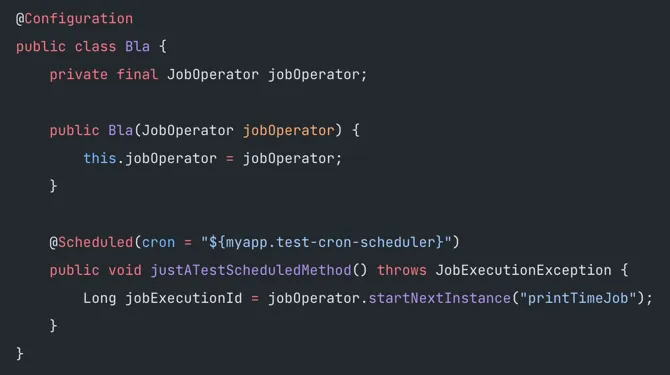
so my scheduler looks like that:
    @Configuration
    public class Bla {
        private final JobOperator jobOperator;

        public Bla(JobOperator jobOperator) {
            this.jobOperator = jobOperator;
        }

        @Scheduled(cron = "${myapp.test-cron-scheduler}")
        public void justATestScheduledMethod() throws JobExecutionException {
            Long jobExecutionId = jobOperator.startNextInstance("printTimeJob");
        }
    }
and my batch job looks like that:
    @Bean
    Job printTimeJob() {
        return jobBuilderFactory.get("printTimeJob")
                .incrementer(new RunIdIncrementer())
                .flow(printTimeStep())
                .end()
                .build();
    }

    @Bean
    Step printTimeStep() {
        return stepBuilderFactory.get("printTimeStep")
                .tasklet((contribution, chunkContext) -> {
                    System.out.println(LocalDateTime.now());
                    return null;
                })
                .build();

    }
the output is a little bit more messed up…
17:39:10.007 INFO  org.springframework.batch.core.launch.support.SimpleJobOperator - Locating parameters for next instance of job with name=printTimeJob
17:39:10.020 INFO  org.springframework.batch.core.launch.support.SimpleJobOperator - Attempting to launch job with name=printTimeJob and parameters={run.id=1}
17:39:10.082 INFO  org.springframework.batch.core.launch.support.SimpleJobLauncher - Job: [FlowJob: [name=printTimeJob]] launched with the following parameters: [{run.id=1}]
17:39:10.137 INFO  org.springframework.batch.core.job.SimpleStepHandler - Executing step: [printTimeStep]
2017-11-03T17:39:10.156
17:39:10.188 INFO  org.springframework.batch.core.launch.support.SimpleJobLauncher - Job: [FlowJob: [name=printTimeJob]] completed with the following parameters: [{run.id=1}] and the following status: [COMPLETED]
and we have some extra time consumed by the framework… check millies in printed time. 01-10 vs 60 - 156
but in the end… it’s more or less what we expected.
so… that’s it.
I hope that you guys enjoyed.
see you next time and until then - happy coding!
PS. one more thing!
don’t forget to use those somewhere in your configuration:
    @EnableBatchProcessing
    @EnableScheduling